
Close Menu
  • Home
  • News
  • Tech Jungle
  • RAWRMag
  • BIZnest
  • Brands
  • About
    • BE PART OF THE LIONHEARTV FAMILY!
    • THE PRIDE
    • ADVERTISE AT LIONHEARTV
What's Hot

Capital One Philippines secures 2nd place as one of the country’s great places to work

April 15, 2026

Prime Video Embraces Filipino Storytelling, Unveils Seven Originals And Even More Licensed Titles in Expanded Local Slate

April 15, 2026

Check out these brand new posters for ‘Spider-Man: Brand New Day’

April 15, 2026
Facebook X (Twitter) Instagram
Facebook X (Twitter) Instagram YouTube TikTok
LionhearTVLionhearTV
  • Home
  • News
  • Tech Jungle
  • RAWRMag
  • BIZnest
  • Brands
  • About
    • BE PART OF THE LIONHEARTV FAMILY!
    • THE PRIDE
    • ADVERTISE AT LIONHEARTV
LionhearTVLionhearTV
Home»Press Release»Wearable Wallet? GCash is First to Do It in the Philippines with HUAWEI wearables!
Press Release

Wearable Wallet? GCash is First to Do It in the Philippines with HUAWEI wearables!

Lion's DenBy Lion's DenJuly 25, 2025No Comments4 Mins Read
Share
Facebook Twitter Reddit Pinterest Email

Many Filipinos are masters of finding the next “life hack.” We’re always finding new ways to move smarter, live lighter, and stay ahead. And that’s why wearable payments feel like the kind of upgrade we’ve always needed.

Many of us have probably seen wearable payments in action while traveling abroad through a seamless checkout at a convenience store after a morning run or maybe a quick payment at a café right after a tour. It’s effortless, exciting, but also perceived to be out of reach. A perk reserved for those lucky enough to travel abroad.

At least until now, as GCash brings the next big life hack within everyone’s reach with Watch Pay.

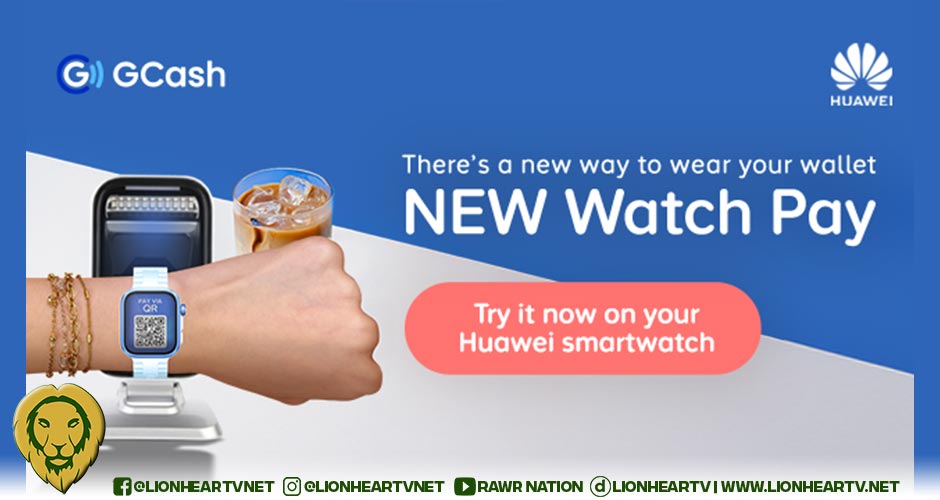
GCash and Huawei are bringing the ease and convenience of wearable payments to the Philippines for the very first time with the launch of Watch Pay, a scannable QR code linked to your GCash wallet built right into your Huawei smartwatch. Whether you’re grabbing groceries, dining out, or buying a new pair of sneakers, your wallet can now be worn on your wrist – and you can experience payments on the go like never before.

Currently available on the HUAWEI Watch Ultimate, Watch 4, Watch 5, Watch Fit 3, Watch Fit 4 Series, Watch GT 4 and 5 Series, Band 10, Watch D2 2, Watch Pay introduces Filipinos to the next-generation way to pay. It’s secure, seamless, and always within arm’s reach, making smarter and more seamless payments available for all.

Simplified and convenient, powered by innovative technology
What makes Watch Pay exciting is the ease it brings to everyday moments all through the same smartwatch that powers your workouts. You’re already tracking your steps, checking your vitals, and logging your workouts with your smartwatch. Now, it’s your wallet too, so smart spending just got even smarter. There’s no need to carry cash or cards when out on your errands, now no more fumbling through your wallet when you’re in a rush or getting caught up with a minor inconvenience like a buggy card terminal.

With Watch Pay, all you need is the QR code that will be conveniently generated on your watch. This QR code will simply be scanned, and you’re good to go. This technology ensures that payments are quick and easy.

Since each transaction still runs through the GCash app, there’s also no need to adjust how you track your spending. You can still find your payments recorded in the app’s transaction history.

Watch Pay is available to all GCash users and is accepted across GCash’s wide network of partner merchants. Imagine how uncomplicated it would be to go grocery shopping at Robinsons Supermarket, buying new shoes at the SM Store, or even paying for a quick snack and coffee at Lawson – all without the trouble of bringing lots of cash with you. It’s subtle, but it does make daily errands feel a little more effortless.

How to link your smartwatch and use Watch Pay
Ready to activate your Watch Pay? Follow these steps below:

Open GCash on your smartwatch
Tap on Link
Scan the QR code with your HUAWEI or Android phone
Press Bind and enter the linking code
Confirm your device to bind

Easily use Watch Pay by following these simple instructions:
Open “settings” on your HUAWEI smartwatch.
Search for and tap “Payments”.
Tap on “Open GCash”.
A QR code will be generated, which the merchant can now scan.

GCash has been a go-to for everything from paying bills to sending money. With the arrival of Watch Pay, the country’s top finance app is taking things a step further once again, bringing a global innovation right to our wrists. With every new feature, GCash is quickly redefining what the best way to pay looks like. Experience it for yourself today and download the GCash app on the App Store or Google Play Store.

Comments

GCash Huawei Phillip Brian Anselmo rebel marketing Watch Pay
Share. Facebook Twitter Pinterest LinkedIn Reddit Email
Previous ArticleMove more daily with vivo Watch GT, price starting at Php 7,599
Next Article Mika Salamanca and Will Ashley join relief efforts for ‘Crising’ and Habagat victims
Lion's Den
  • Website
  • Facebook
  • X (Twitter)
  • Instagram

LionhearTV has always believed in what the everyday reader can contribute, and has always been open to receiving input, help, or leads on stories. Readers are always encouraged to drop us their thoughts either by either by leaving a comment on a post, or contact us directly – email us at lionheartvnet@gmail.com.

Related Posts

Capital One Philippines secures 2nd place as one of the country’s great places to work

April 15, 2026

Prime Video Embraces Filipino Storytelling, Unveils Seven Originals And Even More Licensed Titles in Expanded Local Slate

April 15, 2026

Check out these brand new posters for ‘Spider-Man: Brand New Day’

April 15, 2026

Maxim Backs Call to Support TNVS Drivers, Offers 0% Commission in Select Cities

April 15, 2026
Add A Comment

Comments are closed.

Find us on Facebook
Blogmeter.Top


Trending

LionhearTV continues to grow: Strengthening BIZNest, Tech Jungle, and RAWRTrip for 2026

February 14, 2026

15 Adored PH Celebrity Loveteams That Eventually Parted Ways

February 2, 2026

25 Best Teleseryes of 2025

January 14, 2026

GMA Pictures rolls out ambitious 2026 film slate, highlights animated features and major industry collaborations

January 7, 2026

Invited but silent: Celebrities, Influencers face backlash for not promoting MMFF 2025 films

January 3, 2026
Showbiz News

‘Wonderful Nightmare’ pocket presscon turns intimate

April 15, 2026

‘Scorpio Nights 4’ press session uncovers a darker, more reflective turn for the VMX franchise

April 15, 2026

Offshore Music unveils fresh summer releases for 2026

April 15, 2026

Crazy Carabao Brewing Co. opens new Laguna brewery experience

April 15, 2026

Mang Inasal and Fyang Smith celebrate a halo-halo refresh at the Dessert Museum

April 15, 2026
Most Viewed

Capital One Philippines secures 2nd place as one of the country’s great places to work

April 15, 2026

Prime Video Embraces Filipino Storytelling, Unveils Seven Originals And Even More Licensed Titles in Expanded Local Slate

April 15, 2026

Check out these brand new posters for ‘Spider-Man: Brand New Day’

April 15, 2026

‘Wonderful Nightmare’ pocket presscon turns intimate

April 15, 2026

10 K-Drama Moments Filipinos Kept Coming Back to on Viki Over 10 Years

April 15, 2026
eMVP Digital is an online empire that useful pieces of information and a resource for a daily dose of entertainment in all forms. It produces LionhearTV.net, Dailypedia.net, RAWR Awards, RAWRMag, DailyPIPOL, and Broken Lion. These platforms have a highly-engaged audience per month, which varies from ages and sexes.


Blogmeter.Top
© 2026 LionhearTV.net.
  • Home
  • News
  • Tech Jungle
  • RAWRMag
  • BIZnest
  • Brands
  • About
    • BE PART OF THE LIONHEARTV FAMILY!
    • THE PRIDE
    • ADVERTISE AT LIONHEARTV

Type above and press Enter to search. Press Esc to cancel.