
Close Menu
  • Home
  • News
  • Tech Jungle
  • RAWRMag
  • BIZnest
  • Brands
  • About
    • BE PART OF THE LIONHEARTV FAMILY!
    • THE PRIDE
    • ADVERTISE AT LIONHEARTV
What's Hot

Your Summer Just Got Better with the MyOPPO App

March 18, 2026

‘Eraserheads: Combo on the Run’ to Hold North American Premiere Screenings with Ely Buendia Live Concert

March 18, 2026

DOST urges PH researchers toward responsive, cross-sector research

March 18, 2026
Facebook X (Twitter) Instagram
Facebook X (Twitter) Instagram YouTube TikTok
LionhearTVLionhearTV
  • Home
  • News
  • Tech Jungle
  • RAWRMag
  • BIZnest
  • Brands
  • About
    • BE PART OF THE LIONHEARTV FAMILY!
    • THE PRIDE
    • ADVERTISE AT LIONHEARTV
LionhearTVLionhearTV
Home»Social Media»A Guide To TikTok: How To Get Started on the App in 2021
Social Media

A Guide To TikTok: How To Get Started on the App in 2021

Lion's DenBy Lion's DenJanuary 7, 2021No Comments3 Mins Read
Share
Facebook Twitter Reddit Pinterest Email

Manila, Philippines – January 2020 – It’s never too late to start using TikTok! What was once perceived as an app only for Gen Z has evolved into a community for all ages. No matter how old you are, you can have just as much fun on TikTok. The TikTok community embraces users of all ages, and provides never-ending entertainment for all.

Tech savvy or not, it’s easy for anyone to learn how to use TikTok. If you’re new to the app or simply want to learn more about it, this easy-to-follow guide can help you navigate and quickly get started on TikTok this new year.

About the app’s interface

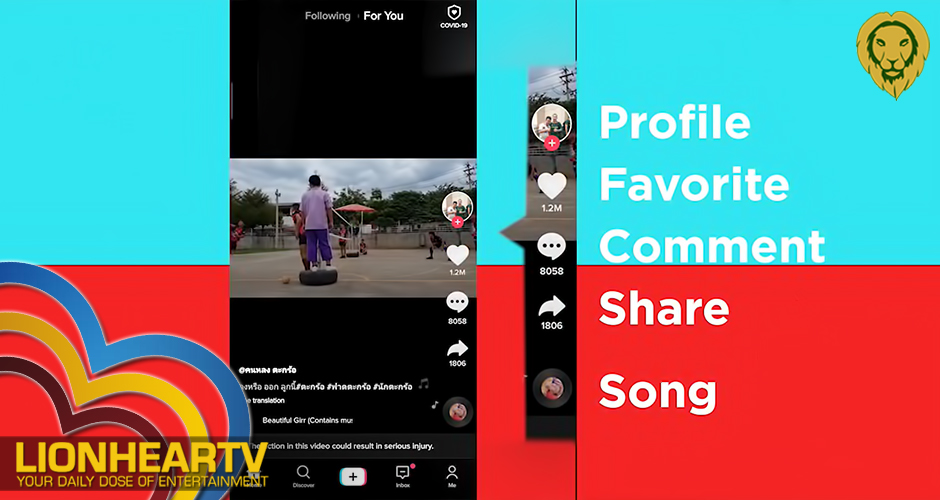
When you open TikTok, you will see that the app is divided into two main feeds – For You and Following. On the For You feed, you will see recommended videos that you might like. The Following feed shows you the videos of people that you choose to follow on the app.

As you watch videos on your feed, you will notice that each one has a series of icons on the right side of the screen. Here is what each of them mean, from top to bottom:

  • Profile – Tap this when you want to view the profile of the user who posted the video.
  • Favorite – This looks like a heart, and tapping on it adds the video to your favorites.
  • Comment – You can use to leave comments and reactions on a video.
  • Share – Use this icon, which looks like an arrow pointing to the right, to share the video on other platforms.
  • Song – The spinning record at the bottom right of the screen represents the song or sound clip that’s playing in the video. Tap on it to see details about the song.

Creating your own content

Posts on TikTok must be at least five seconds, and a maximum of 60 seconds long. To record a video or upload videos from your phone gallery, tap the plus sign found at the bottom of the screen.

You can edit videos within the app, and add transitions, filters, special effects, and music, to make your content more fun to watch.

Exploring hashtags

Tap Discover, found on the lower portion of your screen, to view trending hashtags on the app. Here, you can get a lot of ideas for your own content, including the best hashtag challenges to join.

Notifications

The Notifications or Inbox icon is found at the bottom of your home screen. Tap on it to see who liked or commented on your videos.

Now that you’ve learned the basics, it’s time to explore and enjoy the app for yourself! Download TikTok on your iOS and Android devices today to get started.

Comments

Comment Favorite Fifthgear PR Profile TikTok
Share. Facebook Twitter Pinterest LinkedIn Reddit Email
Previous ArticleMakati police chief in hot water as celebrities and netizens slammed his ‘ang mga bakla, lalaki pa rin sila’ statement
Next Article DOT celebrates Boracay and Palawan inclusion in Condé Nast’s 25 Best Island Beaches in the World list
Lion's Den
  • Website
  • Facebook
  • X (Twitter)
  • Instagram

LionhearTV has always believed in what the everyday reader can contribute, and has always been open to receiving input, help, or leads on stories. Readers are always encouraged to drop us their thoughts either by either by leaving a comment on a post, or contact us directly – email us at lionheartvnet@gmail.com.

Related Posts

Alvin Aragon draws criticism over controversial remarks on sexuality

March 18, 2026

Arron Villaflor on viral video scandal: ‘Men can be victims also’

March 18, 2026

Sachzna Laparan hurt by claims she “bought” her college diploma

March 18, 2026

Nikko Natividad thanks bashers, says negative comments help him earn online

March 17, 2026
Add A Comment

Comments are closed.

Find us on Facebook
Blogmeter.Top


Trending

LionhearTV continues to grow: Strengthening BIZNest, Tech Jungle, and RAWRTrip for 2026

February 14, 2026

15 Adored PH Celebrity Loveteams That Eventually Parted Ways

February 2, 2026

25 Best Teleseryes of 2025

January 14, 2026

GMA Pictures rolls out ambitious 2026 film slate, highlights animated features and major industry collaborations

January 7, 2026

Invited but silent: Celebrities, Influencers face backlash for not promoting MMFF 2025 films

January 3, 2026
Showbiz News

Alvin Aragon draws criticism over controversial remarks on sexuality

March 18, 2026

Arron Villaflor on viral video scandal: ‘Men can be victims also’

March 18, 2026

Sachzna Laparan hurt by claims she “bought” her college diploma

March 18, 2026

Nikko Natividad thanks bashers, says negative comments help him earn online

March 17, 2026

JM Ibarra gives Fyang Smith an infinity ring with special meaning

March 17, 2026
Most Viewed

Your Summer Just Got Better with the MyOPPO App

March 18, 2026

‘Eraserheads: Combo on the Run’ to Hold North American Premiere Screenings with Ely Buendia Live Concert

March 18, 2026

DOST urges PH researchers toward responsive, cross-sector research

March 18, 2026

Alvin Aragon draws criticism over controversial remarks on sexuality

March 18, 2026

World of Warships and Sabaton Take Centre Stage with a Brand New ‘Yamato’ Collaboration

March 18, 2026
eMVP Digital is an online empire that useful pieces of information and a resource for a daily dose of entertainment in all forms. It produces LionhearTV.net, Dailypedia.net, RAWR Awards, RAWRMag, DailyPIPOL, and Broken Lion. These platforms have a highly-engaged audience per month, which varies from ages and sexes.


Blogmeter.Top
© 2026 LionhearTV.net.
  • Home
  • News
  • Tech Jungle
  • RAWRMag
  • BIZnest
  • Brands
  • About
    • BE PART OF THE LIONHEARTV FAMILY!
    • THE PRIDE
    • ADVERTISE AT LIONHEARTV

Type above and press Enter to search. Press Esc to cancel.