

Close Menu
  • Home
  • News
  • Tech Jungle
  • RAWRMag
  • BIZnest
  • Brands
  • About
    • BE PART OF THE LIONHEARTV FAMILY!
    • THE PRIDE
    • ADVERTISE AT LIONHEARTV
What's Hot

GMA Radio stations dominate Mega Manila airwaves in February 2026

March 21, 2026

‘Huwag Kang Titingin’ trailer terrifies netizens ahead of April 15 release

March 21, 2026

Kapuso stars bring thrills and cheers to Araw ng Dabaw 2026

March 21, 2026
Facebook X (Twitter) Instagram
Facebook X (Twitter) Instagram YouTube TikTok
LionhearTVLionhearTV
  • Home
  • News
  • Tech Jungle
  • RAWRMag
  • BIZnest
  • Brands
  • About
    • BE PART OF THE LIONHEARTV FAMILY!
    • THE PRIDE
    • ADVERTISE AT LIONHEARTV
LionhearTVLionhearTV
Home»Digital TV»5 Easy Ways to Saying Yes to Kids
Digital TV

5 Easy Ways to Saying Yes to Kids

Lion's DenBy Lion's DenMarch 14, 2021No Comments4 Mins Read
Share
Facebook Twitter Reddit Pinterest Email

There are many creative ways you can keep family bonding fun and exciting while staying at home, and it all begins by saying YES!

Here are some fun ways to create even more memorable family bonding times:

1. Say YES to a more exciting family meal time – Synchronize your work breaks with the kids’ health breaks from school, giving you the much-needed opportunity to relax and insert a bit of family time. Besides eating together, why not bring the kids to the kitchen and make fun meals together as well? The little ones will enjoy preparing simple snacks like a club sandwich or designing chocolate chip cookies with frosting and sprinkles, while older kids will feel like boss chefs after cooking meals such as lasagna or creamy cordon bleu. Inviting them to help out in the kitchen is a delicious family activity that will definitely hone kids’ cooking skills while having a ton of fun during and after making their fave dishes!

2. Say YES to extended game time – Reward children who did a good job in school and good deeds at home by giving them extra hours of entertainment via their gadgets and games. Join in the fun and learn how to play their favorite games with them — and maybe against them, too, in a fun family competition!

3. Say YES to learning – Who said learning is boring? Besides the usual fun activities, try something new with kids and perform cool projects together. You can get them started on exciting STEM projects (like an experiment on how to build an erupting volcano), or create a mini-show together (with their own screenplay, costumes, and acting!). Learn new skills as a family, which can hone kids’ minds, opening them to a world of possibilities as they grow older.

4. Say YES to family fitness – The family that exercises together… has tons of fun together! Even a short walk or run around the garden will give you and the children a good dose of mood-boosting energy. If you prefer working out indoors, there are kid-friendly exercise videos online that the whole family can do. Either way, you can make your family fitness routine more fun by turning it into a contest, where the winner gets to choose what the family can have for dinner, or perhaps dibs on the biggest dessert!

5. Say YES to enjoying watch parties on Netflix – Movie nights can be even MORE fun with Netflix! Have kids choose their favorite titles and turn your living area or bedroom into a screening room for a full cinematic experience. Prepare popcorn or more movie snacks, dim the lights, maybe even print out DIY movie tickets and throw in lots of pillows for extra comfort!

Netflix offers a ton of exciting shows that are appropriate for all ages. Adults have the option to let kids explore the service on their own during their free time. Setting up the necessary Parental Control features available on the service is super easy. Follow these steps before letting kids explore Netflix on their own:
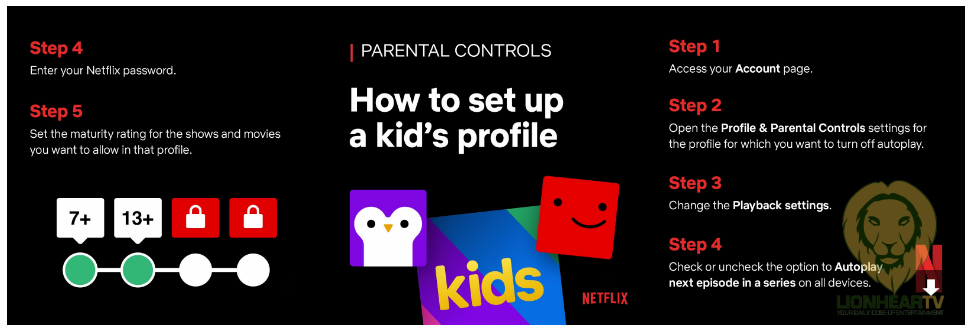
Create their own profiles with specific maturity settings – Allow them to explore Netflix on their own using the profile that you created with the age-appropriate maturity settings. To modify each profile’s maturity setting, change it via the account settings. Open the Profile and Parental control settings of the kid’s account, and manually set the appropriate maturity rating.

Create a personalized lock on your main account – The main account holder can set up a four-digit PIN in the settings that will prompt every time someone tries to access the profile. This way, you can keep kids from using the profiles that have access to all titles on the service.

Finally, why not have the entire family watch Yes Day on Netflix. Always feeling like they have to say NO to their kids and co-workers, Allison and Carlos decide to give their three kids a YES DAY — where for 24 hours the kids make the rules. Little did they know that they’d be going on a whirlwind adventure around Los Angeles, that would bring the family closer to each other than ever before. The film, starring Jennifer Garner and Édgar Ramírez, premieres on March 12.

Comments

adpubhub. PR Netflix YES DAY Yes to Kids
Share. Facebook Twitter Pinterest LinkedIn Reddit Email
Previous ArticleMalou De Guzman, Richard Yap, thankful for the Kapuso warm welcome
Next Article Use your GrabPay Card to get a chance to win an iPhone 12
Lion's Den
  • Website
  • Facebook
  • X (Twitter)
  • Instagram

LionhearTV has always believed in what the everyday reader can contribute, and has always been open to receiving input, help, or leads on stories. Readers are always encouraged to drop us their thoughts either by either by leaving a comment on a post, or contact us directly – email us at lionheartvnet@gmail.com.

Related Posts

‘Scorpio Nights 4’ premieres on VMX this March 31

March 21, 2026

Alex Calleja unveils new comedy special ‘Past is Past’

March 20, 2026

‘Kumusta’ brings cultures together as Ji Chang-wook and Filipino stars share culinary journey at Manila media conference

March 20, 2026

98th Academy Awards watch party brings hollywood glamour to The Peninsula Manila

March 20, 2026
Add A Comment

Comments are closed.

Find us on Facebook
Blogmeter.Top


Trending

LionhearTV continues to grow: Strengthening BIZNest, Tech Jungle, and RAWRTrip for 2026

February 14, 2026

15 Adored PH Celebrity Loveteams That Eventually Parted Ways

February 2, 2026

25 Best Teleseryes of 2025

January 14, 2026

GMA Pictures rolls out ambitious 2026 film slate, highlights animated features and major industry collaborations

January 7, 2026

Invited but silent: Celebrities, Influencers face backlash for not promoting MMFF 2025 films

January 3, 2026
Showbiz News

Solaire Resort unleashes a culinary spectacle with Mega Brunch featuring Five Signature Restaurants

March 20, 2026

Mister Donut launches first drive-thru branch in Metro Manila, introducing new look and expanded menu

March 20, 2026

‘Kumusta’ brings cultures together as Ji Chang-wook and Filipino stars share culinary journey at Manila media conference

March 20, 2026

United Kingdom and Portugal deliver electrifying showcase at the 13th Philippine International Pyromusical Competition

March 20, 2026

From Ranked Matches to Reels: Why the OPPO Reno15 5G Fits the Gamer-Creator Lifestyle

March 20, 2026
Most Viewed

GMA Radio stations dominate Mega Manila airwaves in February 2026

March 21, 2026

‘Huwag Kang Titingin’ trailer terrifies netizens ahead of April 15 release

March 21, 2026

Kapuso stars bring thrills and cheers to Araw ng Dabaw 2026

March 21, 2026

Dylan Burton, AJ Colico to represent PH at Topklout 10th K-World Influencer Summit in China

March 21, 2026

‘Scorpio Nights 4’ premieres on VMX this March 31

March 21, 2026
eMVP Digital is an online empire that useful pieces of information and a resource for a daily dose of entertainment in all forms. It produces LionhearTV.net, Dailypedia.net, RAWR Awards, RAWRMag, DailyPIPOL, and Broken Lion. These platforms have a highly-engaged audience per month, which varies from ages and sexes.


Blogmeter.Top
© 2026 LionhearTV.net.
  • Home
  • News
  • Tech Jungle
  • RAWRMag
  • BIZnest
  • Brands
  • About
    • BE PART OF THE LIONHEARTV FAMILY!
    • THE PRIDE
    • ADVERTISE AT LIONHEARTV

Type above and press Enter to search. Press Esc to cancel.