



In the recent past, text scammers would claim to be an OFW relative using their new roaming number and ask for prepaid load, or pretend to mis-send load credits and ask you to return them. While we still get our share of text scams from time to time, a lot of us already associate these messages with fraud and simply ignore them.

But as the use of e-wallets and online payment channels have become increasingly popular and indispensable, scams have evolved to be much more sophisticated. A common scam is done through phishing, wherein a fraudster gathers personal information like MPINs and OTPs, and uses this to gain access to accounts and steal the funds of the user.
Targeting users of leading e-wallet platforms, phishing scams happen not just through text messages, but also through call and social media platforms. While trusted financial institutions such as GCash double up on their security measures through security features such as DoubleSafe Face ID against cybercrimes, it is also helpful to be aware of new scams, how they work, and warning signs to catch them early. Here are common phishing scams e-wallet users should look out for:
- ‘Magtop-up para sa online gambling’ phishing scam
It’s very tempting to earn extra income while having fun, but that could be the opposite if you find yourself a victim of scammers that pose as online gambling sites. This phishing scam involves fraudsters leading players to a non-PAGCOR licensed gaming provider, where they will be asked to ‘top-up’ using a fake GCash portal, often using the same layout, color and logos, to retrieve credentials and access the victim’s account.

How do you spot this?
When you create an account with suspicious gambling sites, you will be given the option to use your GCash account so you could top up your account. You will be redirected to a fake website that looks like a GCash portal, and will be prompted to enter your mobile number, OTP and MPIN. Once you’ve provided your information, hackers will now be able to access your account.
When asked to link your GCash account, always check the URL or name of the link to make sure you are on the GCash portal. Legitimate GCash portals begin in https:// and only end in ‘gcash.com’ while suspicious portals may have a series of numbers in the beginning, extra characters, and have misspelled words (ex. Gccash vs GCash).
When requesting an OTP, always read the SMS to make sure you are not unknowingly linking a foreign device to your account. Never share your MPIN and OTP to anyone, including suspicious online gaming sites.
● ‘Nakahold ang account mo’ phishing scam
While there are scams that exploit different forms of entertainment, there are also those that cause panic and simulate emergency situations. The ‘Nakahold ang account mo’ phishing scam involves fraudsters pretending to be from legitimate financial institutions and making up negative consequences to encourage users into immediately providing their sensitive information.
How do you spot this?
The fraudster will contact you, either through a phone call or social media platforms, and will claim to be a GCash employee, telling you that your account is on hold or frozen. They will then tell you that you can only have your account activated by sharing your MPIN and OTP. Once they have this information, they can gain access to your account and steal your funds.
How could you stop this?
GCash will never ask you to activate your account through a phone call or through messaging applications. All transactions are only done through the official GCash app, including resolving concerns related to your account.
If a notice feels rushed, it’s most likely a phishing scam! Check your account through the GCash app first to confirm if it is indeed on hold and don’t share your MPIN and OTP to anyone – even those who claim to be from GCash. Remember that GCash will never ask these details from you..
- ‘Nanalo ka ng prize!’ Phishing Scam
Remember those earlier text scams telling potential victims that they’ve won a raffle and asking them to send a processing fee to be able to claim a prize? Just like this, a third phishing scam also notifies potential victims that they’ve won prizes to a GCash raffle they did not join. However, instead of asking them for a fee, this involves using a seemingly legitimate link to gain your credentials and access your account.

How do you spot this?
While there are scams that exploit different forms of entertainment, there are also those that cause panic and simulate emergency situations. The ‘Nakahold ang account mo’ phishing scam involves fraudsters pretending to be from legitimate financial institutions and making up negative consequences to encourage users into immediately providing their sensitive information.
How do you spot this?
The fraudster will contact you, either through a phone call or social media platforms, and will claim to be a GCash employee, telling you that your account is on hold or frozen. They will then tell you that you can only have your account activated by sharing your MPIN and OTP. Once they have this information, they can gain access to your account and steal your funds.
How could you stop this?
GCash will never ask you to activate your account through a phone call or through messaging applications. All transactions are only done through the official GCash app, including resolving concerns related to your account.
If a notice feels rushed, it’s most likely a phishing scam! Check your account through the GCash app first to confirm if it is indeed on hold and don’t share your MPIN and OTP to anyone – even those who claim to be from GCash. Remember that GCash will never ask these details from you..
- ‘Nanalo ka ng prize!’ Phishing Scam
Remember those earlier text scams telling potential victims that they’ve won a raffle and asking them to send a processing fee to be able to claim a prize? Just like this, a third phishing scam also notifies potential victims that they’ve won prizes to a GCash raffle they did not join. However, instead of asking them for a fee, this involves using a seemingly legitimate link to gain your credentials and access your account.
How do you spot this?
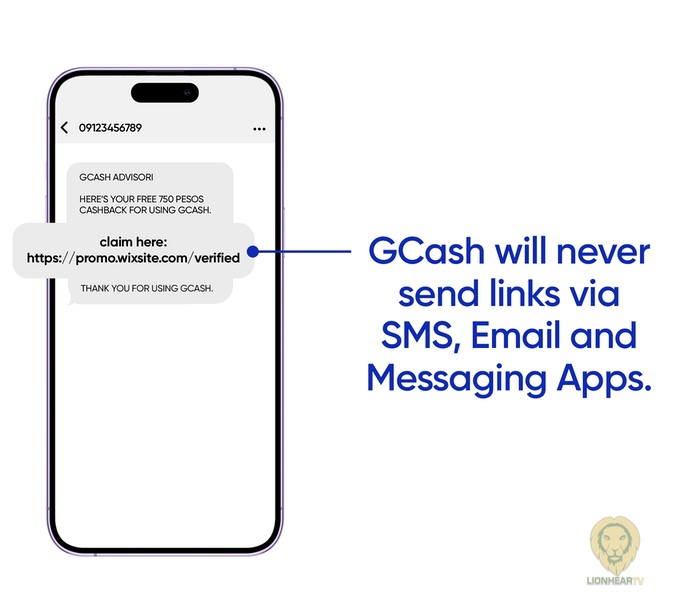
The fraudster, pretending to be from GCash, will send you an SMS or email saying you’ve won a reward, cashback or prize. You will be directed to click a link to claim the prize, leading to a fake website that looks like a GCash portal. Once you enter your mobile number, MPIN and OTP, your account can now be accessed by the cyber criminals.
How could you stop this?
Remember that GCash will never send links via SMS, email and messaging apps and all legitimate rewards and promos will only be communicated through the official GCash app, so never click on links and never share your MPIN and OTP to anyone. Always make it a habit to check any SMS or email you receive. Any communication from an unexpected or unfamiliar sender with an offer that’s too good to be true is usually a phishing scam.

Cybercriminals will continuously find ways to become more creative with their tactics and remain unsuspicious and realistic. Even if you might think you are not worthy of being the target of online predators, being a technology user will always put you as a potential target of any attack, especially if you’re one of the millions of user base of a leading e-wallet app like GCash.
Fortunately, you have one of the best defenses against any phishing scam: you. Now that you are aware of how common phishing scams work, doing your part to protect your e-wallet account only takes a simple action: Do not ever share your MPIN and OTP.
If you encounter phishing scams and fraudulent activities targeting your GCash account, you may report by visiting the official GCash Help Center at help.gcash.com/hc/en-us or messaging Gigi on the website and typing, “I want to report a scam.”
